


Best SPSS Alternatives for UK Dissertations (2026-27)
September 18, 2026
How to Convert a Printed Thesis Into an Editable Digital Document
September 24, 2026
Formatting · GCC-wide
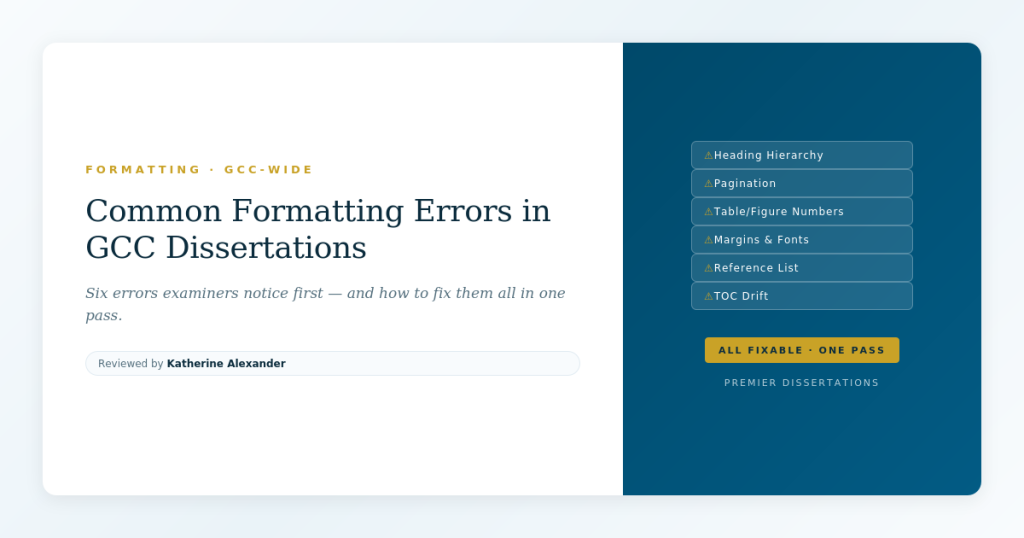
The six formatting mistakes that appear in almost every GCC dissertation — and how to catch them all in a single editing pass before submission.
In this article
Submitting soon? A formatting review catches the errors you have gone blind to after months of writing.
Order a reviewWhy Formatting Errors Matter More Than You Think
No examiner has ever failed a dissertation solely because of formatting. But formatting creates the first impression — and in academic assessment, first impressions shape how critically every subsequent page is read. A dissertation with clean, consistent formatting signals competence and attention to detail. One with visible errors signals the opposite, and the examiner unconsciously looks harder for problems in the content.
Across GCC universities, formatting requirements vary in their specifics — different margin widths, different font preferences, different heading styles. But the types of errors students make are remarkably consistent. These are not discipline-specific or institution-specific problems. They are the same six mistakes, repeated across programmes, countries, and years. Every one of them is preventable.
Error 1 — Broken Heading Hierarchy
Heading hierarchy means that your document follows a logical, consistent nesting structure: Chapter (Heading 1), then Section (Heading 2), then Subsection (Heading 3), and so on. The most common error is skipping a level — jumping from Heading 1 directly to Heading 3 — or using heading styles inconsistently so that visually similar headings are actually tagged at different levels in the document structure.
This matters for two reasons. First, your table of contents is generated from heading levels, so a broken hierarchy produces a broken TOC. Second, examiners who use the navigation pane in Word or the bookmark panel in a PDF reader will see a disorganised document structure even if the visual formatting looks fine on the printed page.
The fix
Open the Navigation Pane in Word (View → Navigation Pane) and review the heading tree. Every Heading 2 should appear under a Heading 1, every Heading 3 under a Heading 2. If you see orphaned headings at the wrong level, select them and apply the correct style. Do not manually format headings with bold and font-size changes — always use Word's built-in heading styles so the hierarchy is structural, not just visual. For guidance on how heading structure connects to your overall dissertation framework, see our guide to dissertation structure at Qatar University.
Error 2 — Pagination Problems
Pagination errors come in several forms: Roman numerals that do not restart where they should, Arabic numbers that start on the wrong page, blank pages with or without numbers where they should not be, and page numbers that disappear from certain pages (often the first page of a new chapter). Most of these problems stem from section breaks — the mechanism Word uses to allow different page-numbering formats in different parts of the document.
The typical GCC dissertation structure requires Roman numerals (i, ii, iii) for front matter (title page through list of figures) and Arabic numerals (1, 2, 3) starting from Chapter 1. The title page itself usually has no visible number. Getting this right requires at least two section breaks and careful unlinking of headers and footers between sections.
The fix
Turn on paragraph marks (¶) in Word so section breaks are visible. Confirm that a "Section Break (Next Page)" separates front matter from the body. Double-click the footer in each section and check whether "Link to Previous" is toggled off — if it is on, the numbering format from the previous section will override your settings. Restart numbering in the body section at 1. Then check every page manually, including blank pages inserted by "Odd Page" section breaks, which some universities require for binding.
If you cannot see the section breaks, you cannot fix the pagination. Turn on paragraph marks first. A common formatting principle
Error 3 — Table and Figure Numbering
Tables and figures should be numbered sequentially, either through the entire document (Table 1, Table 2, Table 3…) or by chapter (Table 2.1, Table 2.2, Table 3.1…). The most common error is manual numbering that falls out of sequence when tables are added, moved, or deleted during revisions. The second most common error is inconsistent caption placement — tables captioned above (correct convention) and figures captioned below (correct convention), but the student reverses one or both.
A subtler problem occurs when a table or figure is referenced in the text as "Table 4" but the actual table is numbered "Table 5" because an earlier table was removed without updating the references. In a long dissertation, these mismatches accumulate and are almost impossible to catch by reading alone.
The fix
Use Word's "Insert Caption" feature (References → Insert Caption) for all tables and figures. This creates auto-numbered captions that update when you add or remove items. For cross-references in the text, use "Insert Cross-Reference" rather than typing the number manually. When you are finished writing, select all (Ctrl+A) and press F9 to update all fields — then check the List of Tables and List of Figures against the actual content.
Formatting issues you cannot see are the ones that cost marks. A second pair of eyes catches what months of familiarity hides.
Request a formatting reviewError 4 — Inconsistent Margins and Fonts
Margin and font inconsistencies usually enter a dissertation through pasting. When you copy text from a source, a website, or an earlier draft, the pasted content may carry different font settings, line spacing, or paragraph spacing that override your document defaults. Over the course of 15,000 words and dozens of revisions, these inconsistencies accumulate — a paragraph in Calibri here, a line spacing of 1.15 there, a margin that shifts where a section break was accidentally deleted.
Most GCC universities specify margins (commonly 2.54 cm or 1 inch on all sides, sometimes with a wider left margin for binding), font (usually Times New Roman 12pt), and line spacing (usually 1.5 or double). Deviations are immediately visible to an examiner who reads dozens of dissertations each year.
The fix
Select all text (Ctrl+A), apply your required font and size, then set paragraph spacing and line spacing from Format → Paragraph. Use "Paste Special → Unformatted Text" (Ctrl+Shift+V) for any future pasting. Check margins in Layout → Margins and confirm they are consistent across all sections — remember that section breaks can carry their own margin settings. If you are working with bilingual content in Arabic and English, font consistency is doubly important because Arabic fonts render at different apparent sizes than their English counterparts.
Error 5 — Reference-List Formatting
The reference list is the most formatting-intensive section of any dissertation, and it is where errors concentrate most heavily. Common problems include inconsistent use of italics (journal titles italicised in some entries but not others), inconsistent author-name format (full first names in some entries, initials in others), missing DOIs or URLs, and entries that do not match the required referencing style.
These errors are particularly visible because the reference list is one of the few sections an examiner scans in its entirety. A reference list with consistent, correct formatting signals careful scholarship. One with visible inconsistencies suggests that the citations in the text may be equally unreliable — which invites closer scrutiny of your literature review.
The fix
Choose your referencing style and apply it mechanically — the same format for every entry type, every time. If you are using a reference manager (Zotero, Mendeley, EndNote), check its output against your university's style guide, because default styles in these tools do not always match institutional requirements exactly. Our guide to APA 7 referencing for Qatar-based students covers the most common style in detail, and our Bahrain referencing guide maps style expectations across Bahraini institutions. After your final reference list is compiled, review every entry against one checklist: author format, year placement, title capitalisation, source italicisation, volume/issue format, DOI or URL.
The reference manager trap
Reference managers save time but introduce a specific risk: metadata imported from databases is often incomplete or incorrectly formatted. A reference pulled from Google Scholar may have the wrong publication year, a mangled author name, or a missing volume number. Always verify the metadata in your reference manager against the original source — do not assume the import is correct.
Error 6 — Table of Contents Drift
The table of contents is usually generated automatically from heading styles, which means it is only as accurate as the last time you updated it. "TOC drift" is the gap between what the TOC says and what the document actually contains — wrong page numbers, missing sections, heading text that was revised in the body but not in the TOC, or phantom entries from headings that were deleted.
The most common cause is simple: the student updates the TOC early in the writing process and forgets to update it again before submission. The second most common cause is partial updates — right-clicking the TOC and selecting "Update Page Numbers Only" instead of "Update Entire Table," which catches page number changes but misses heading text changes and new or deleted sections.
The fix
Update the TOC as the very last formatting step before submission — after all content is final, all headings are correct, and all page numbers are stable. Right-click the TOC and select "Update Entire Table" (not "Update Page Numbers Only"). Then read through the TOC line by line and compare it to the actual document. Check that every entry links to the correct page, that heading text matches exactly, and that the hierarchy (indentation levels) reflects the actual document structure. For a broader look at how these structural elements fit into the overall shape of a dissertation, see our guide to academic proofreading standards in Oman.
The One-Pass Formatting Checklist
You can catch all six errors in a single focused pass through your document. The key is doing it after content editing is complete — not during. Formatting and content editing are different activities that require different attention, and trying to do both at once means doing neither well.
- Heading hierarchy: Open Navigation Pane, review the tree, fix any orphaned or skipped levels.
- Pagination: Turn on paragraph marks, check section breaks, confirm numbering restarts correctly, verify every page.
- Tables and figures: Update all fields (Ctrl+A → F9), check numbering sequence, verify all cross-references match.
- Margins and fonts: Select all, apply required font/size/spacing, check margins in every section.
- Reference list: Review every entry against your style checklist — one entry at a time.
- Table of contents: Update Entire Table, read line by line, confirm page numbers and heading text.
This pass takes two to three hours for a typical dissertation. That time investment prevents the kind of surface-level errors that undermine an otherwise strong piece of work. If you are managing this alongside employment, our guide to balancing work and postgraduate study in the Gulf covers how to protect dedicated editing time in a busy schedule.
Submit with confidence in every detail
A formatting review catches heading errors, pagination problems, reference inconsistencies, and the surface-level issues that colour how examiners read your work.