

Can Turnitin Detect AI Humanizers? The August 2025 Update Explained
June 30, 2026
How to Respond to Peer Review Comments: Step-by-Step Guide (2026)
July 2, 2026
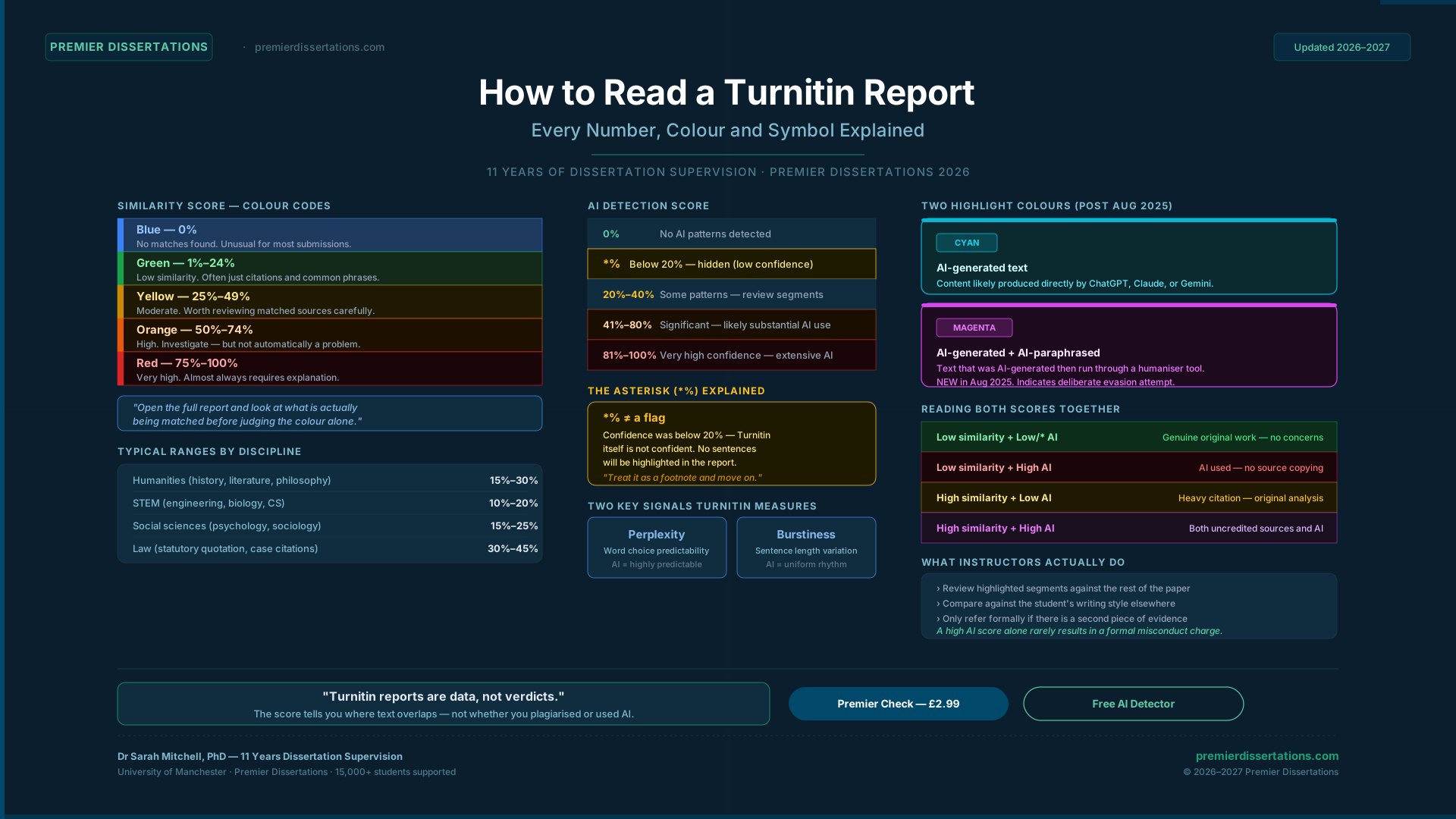
You submitted your assignment. Now you're staring at a Turnitin report with a percentage in the corner, maybe an asterisk next to something labelled "AI," and absolutely no idea whether you should be worried.
I spent eleven years supervising dissertations. I've sat across from students who panicked over a 38% similarity score that was completely fine — and students who were confident about a 12% score that had a serious problem buried inside it. The number alone tells you almost nothing. What matters is knowing how to read it.
This guide explains every number, colour, and symbol in your Turnitin report — and what it actually means for your submission.
The Similarity Score
What It Is — and What It Isn't
The similarity score is the percentage of your submission that Turnitin's algorithm matched against its databases: previously submitted student papers, academic journals, websites, and published books.
The formula is simple: matched words ÷ total words = similarity percentage.
What it is not is a plagiarism score. Turnitin itself is clear on this point — it detects similarity, not intent. A 40% score might be entirely made up of correctly formatted citations. A 10% score might contain a stolen paragraph from a blog post Turnitin didn't happen to index.
The colour coding is a shortcut, not a verdict.
The Colour Codes Explained
| Colour | Score Range | What It Generally Indicates |
|---|---|---|
| Blue | 0% | No matches found. Unusual for most submissions. |
| Green | 1%–24% | Low similarity. Often just citations and common phrases. |
| Yellow | 25%–49% | Moderate. Worth reviewing the matched sources carefully. |
| Orange | 50%–74% | High. Definitely investigate — but not automatically a problem. |
| Red | 75%–100% | Very high. Almost always requires explanation. |
The single most important thing I can tell you: open the full report and look at what is actually being matched before drawing any conclusions from the colour alone.
What's a "Normal" Score in Your Discipline?
There is no universal threshold. What's normal varies significantly by field:
What matters more than the percentage is where the matches appear. A 40% score concentrated entirely in your reference list is a non-issue. A 15% score with a matched paragraph in your argument section is worth a closer look.
What Turnitin Does and Doesn't Index
Turnitin's database is large but not infinite. It includes:
It does not reliably index: books not digitised in its database, some paywalled journal content, content in languages other than English (though coverage is improving), and most internal university documents.
This means a low score doesn't guarantee originality — it means Turnitin found no matches in what it has access to.
The AI Detection Score
How Turnitin's AI Detection Actually Works
Turnitin's AI writing detection analyses your prose for two primary signals:
The AI score represents the percentage of your "qualifying text" (prose sentences above a minimum length threshold) that Turnitin predicts was generated by an AI tool.
Score Ranges and What They Mean
| Score Displayed | What It Means | Risk Level |
|---|---|---|
| 0% | No AI-generated patterns detected | Very low |
| *% (asterisk) | Score was below 20% — hidden to reduce false positives | Low — a footnote, not a flag |
| 20%–40% | Some AI patterns detected — worth reviewing flagged segments | Moderate |
| 41%–80% | Significant AI detection — likely indicates substantial AI use | High |
| 81%–100% | Extensive AI patterns throughout — very high confidence | Very high |
The Asterisk: Why Scores Below 20% Are Hidden
Since July 2024 — and reaffirmed in Turnitin's August 2025 policy update — any AI detection score between 1% and 19% is displayed as an asterisk (*%) rather than a number.
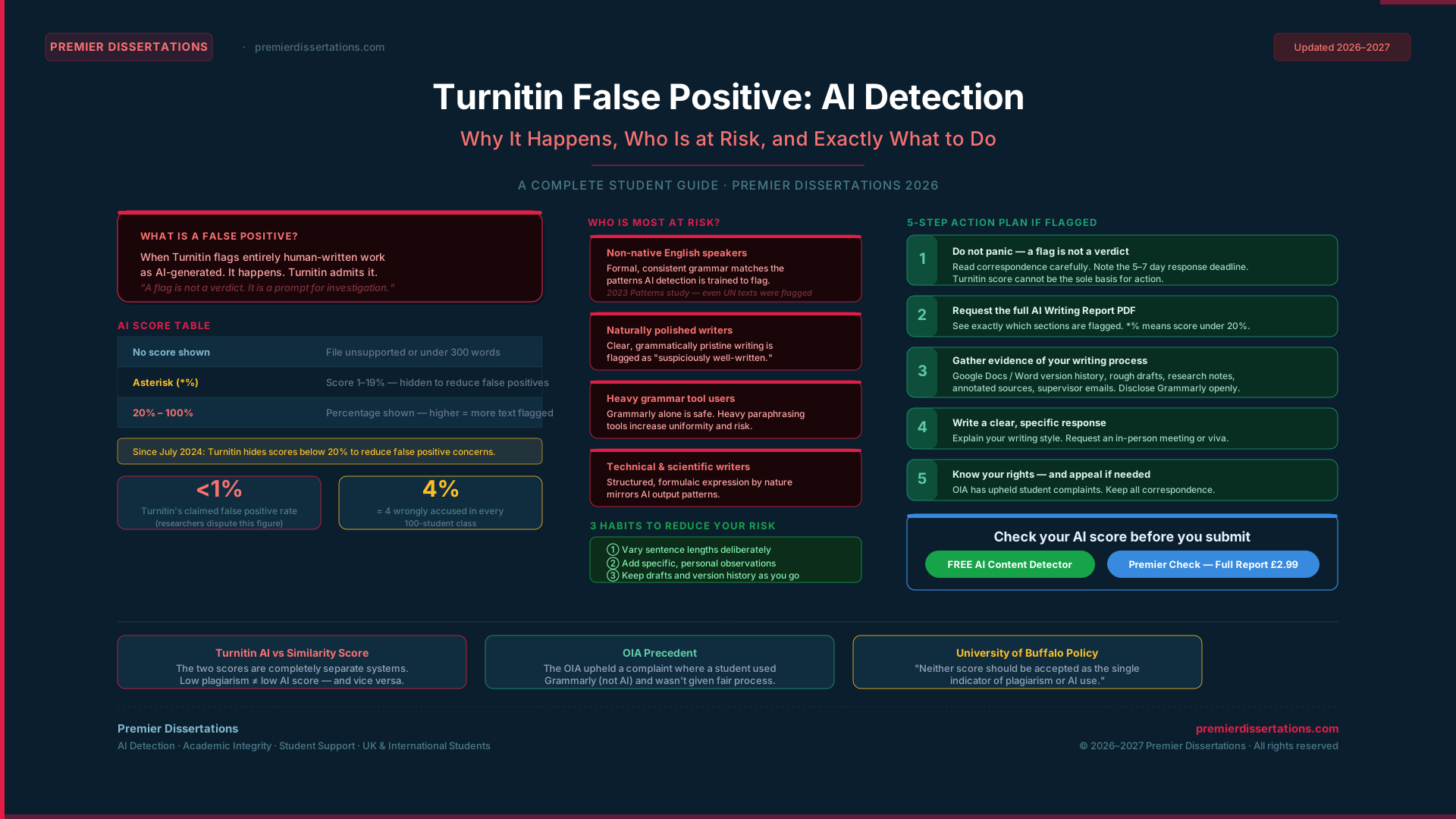
The reason is false positives. Scores below 20% carry a meaningfully higher risk of incorrectly flagging human-written text, particularly for non-native English writers and highly technical or formulaic writing styles. Turnitin made this change specifically to avoid potential false positive incidents at low confidence thresholds.
If you see an asterisk, here is what it means in practice:
The University of Melbourne's official guidance for educators confirms this: an asterisk indicates the score was below the 20% display threshold, and no text will be highlighted within the report.
An asterisk is not a flag. Treat it as a footnote and move on.
False Positives — They Are Real
Turnitin reports a false positive rate of under 1% for documents where at least 20% of the content is AI-generated. However, independent research and educator reports suggest this rate can climb in specific conditions:
If you are wrongly flagged: gather your drafts, version history, and research notes. Request a meeting with your instructor. Most university policies — and Turnitin's own guidance — are explicit that an AI detection report alone is not sufficient evidence of academic misconduct. A second piece of evidence is required before any formal process begins.
Part 3The AI Writing Report — Highlights and Breakdown
Segment-Level Analysis
The AI Writing Report doesn't just give you a single score. It analyses each sentence individually, assigning a confidence score between 0 (very likely human-written) and 1 (very likely AI-generated). Sentences above a confidence threshold are highlighted in the full report.
This matters because it lets your instructor (and you, if your university grants access) identify exactly which parts triggered the detection — not just that something was flagged overall.
Two Colours, Two Different Problems
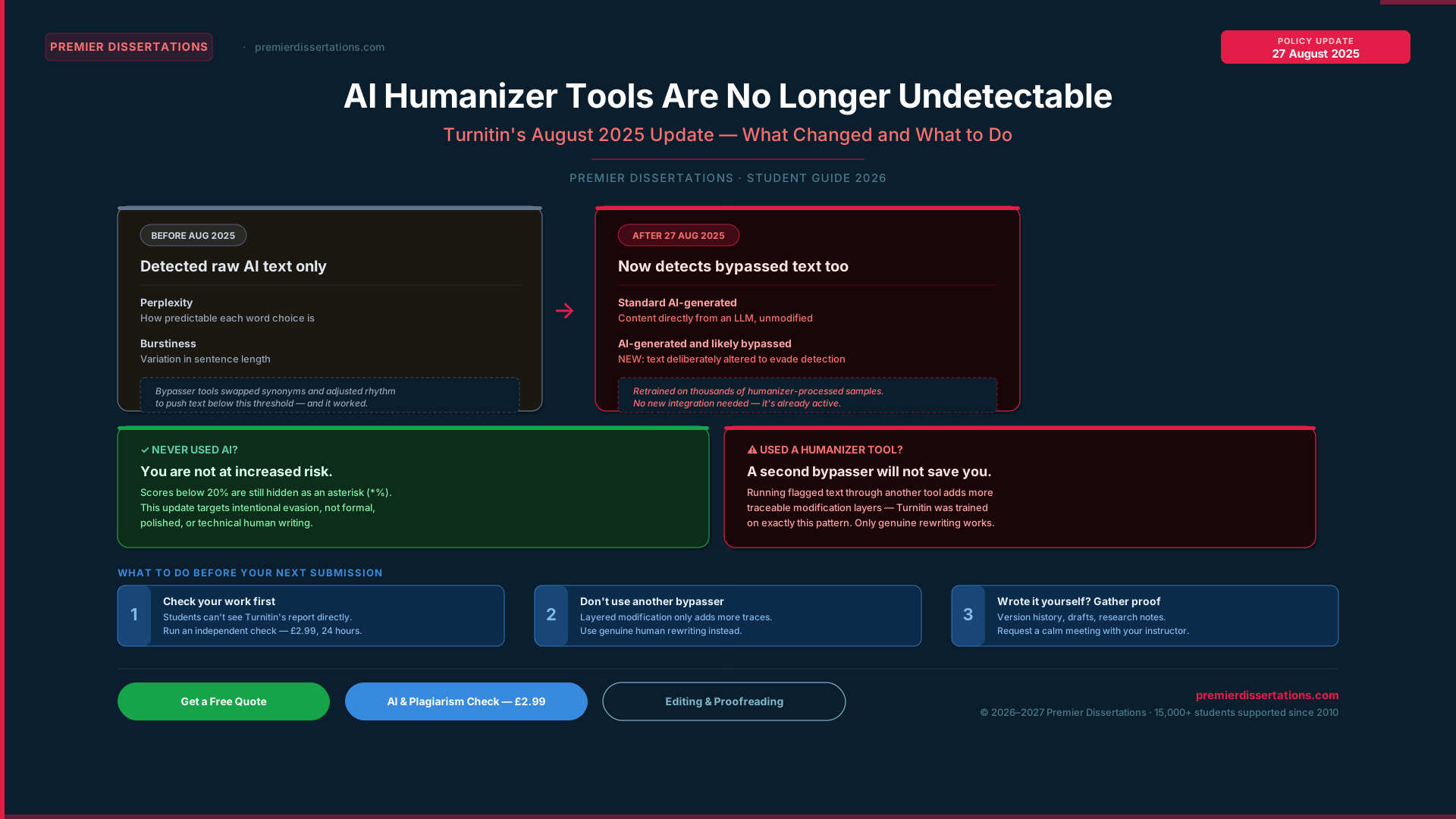
The August 2025 update introduced a second detection category, bringing the total to two:
If you see magenta highlights in a report, the system is indicating it believes an active attempt was made to disguise AI use — which instructors and academic integrity panels will take seriously.
Reading Both Reports Together
The similarity score and AI detection score measure completely different things. They are independent — a paper can be entirely original in the plagiarism sense (no matched sources) while showing high AI detection, or it can be full of correctly cited quotes (high similarity) with no AI signals at all.
Common Scenarios
| Similarity | AI Score | Most Likely Explanation |
|---|---|---|
| Low | Low / * | Genuinely original, human-written work. No concerns. |
| Low | High | Significant AI use — but no copying from existing sources. |
| High | Low | Heavy citation and quotation — but original analytical writing. |
| High | High | Likely combination of uncredited sources and AI-generated content. |
What Your Instructor Actually Does With These Numbers
Most instructors use the report as a starting point for a conversation, not a judgment. Standard practice at most UK and Australian universities (where Turnitin is most widely used) is to:
A high AI score without supporting evidence will rarely result in a formal academic misconduct charge on its own.
Exclusions — Why Your Score Might Be Lower Than Expected
Turnitin allows instructors to apply filters that remove certain content from the similarity calculation:
If these exclusions are applied, your displayed similarity score will be lower than the raw figure. This is by design — it strips out correctly formatted citations and common short phrases that would otherwise inflate the percentage artificially.
If you're unsure whether exclusions are applied to your submission, check with your instructor or look at your university's Turnitin configuration settings.
Part 6The Problem Students Don't Know About
Here is something the official documentation doesn't make obvious: students typically cannot see their own AI Writing Report.
Turnitin does not make the AI detection score or highlighted report visible to students by default. You can submit an assignment, receive a similarity score, and have no idea your AI report flagged 60% of your submission — until your instructor contacts you.
Some universities allow students to view similarity scores before final submission (usually by enabling multiple submission attempts). Almost none grant access to the AI Writing Report on the student side.
This means you are going in blind.
The practical solution is to run your own check before your university does.
Our Premier Check service (£2.99) gives you:
A full AI detection score (0–100%), using the same methodology as Turnitin · A similarity score against published sources · A section-by-section breakdown of flagged text · A PDF report you keep — and your document is never added to any shared database.
For a quick free estimate, use our free AI content detector — no sign-up required.
Frequently Asked Questions
The Bottom Line
Turnitin reports are data, not verdicts. A similarity score tells you where your text overlaps with existing sources — not whether you plagiarised. An AI score tells you how your writing patterns compare to known AI outputs — not whether you used AI.
Once you understand what each element actually measures, the report stops being intimidating and becomes exactly what it was designed to be: a tool to help you improve your work.
If you want to know what your instructor will see before they see it — run your own check first.
Know What Your Instructor Will See — Before They See It
Run your own AI and similarity check before submission. Full Turnitin-style report, no repository upload, results within 24 hours.
No repository upload · No effect on official score · PDF report delivered by emailGet 3+ Free Dissertation Topics within 24 hours?